
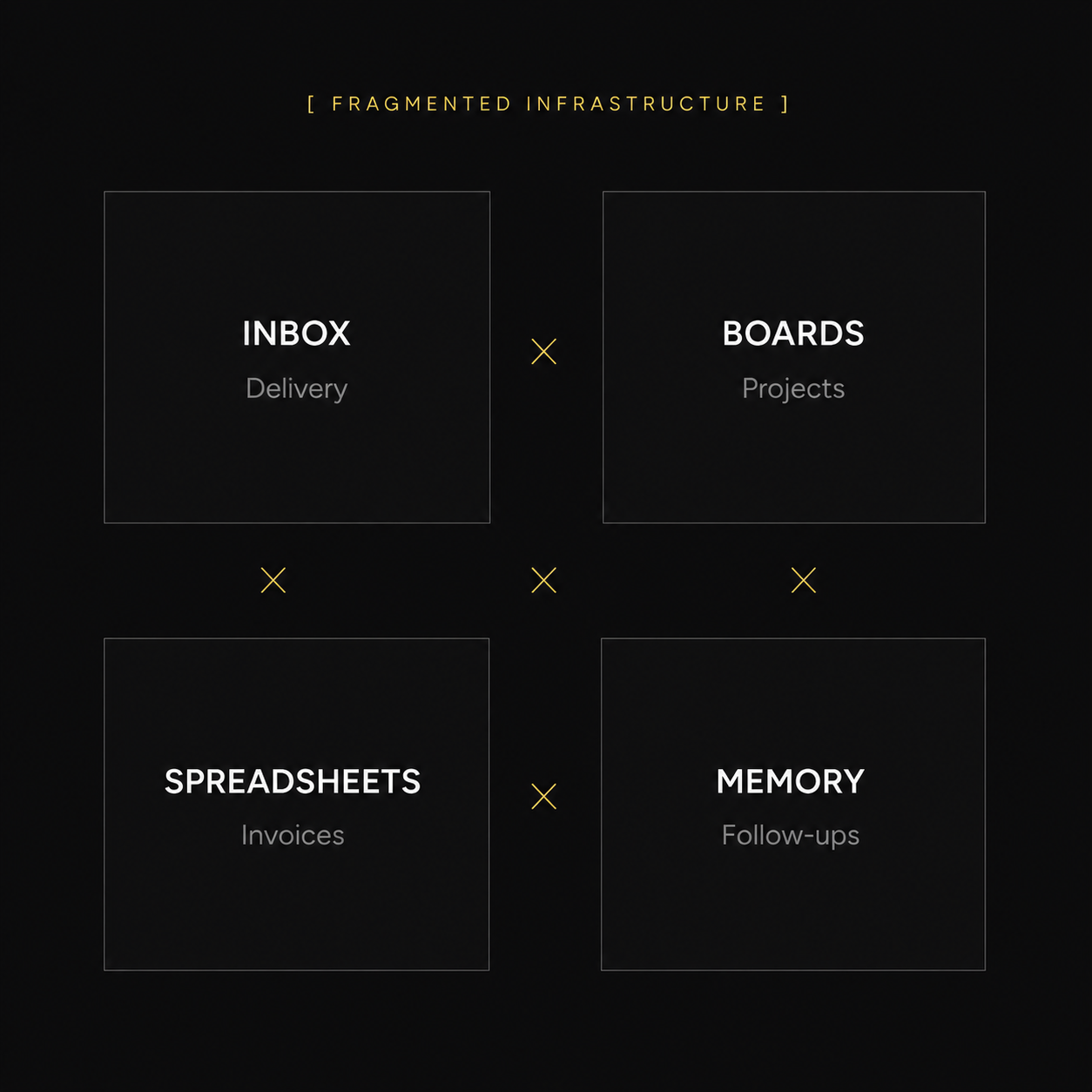
Clients in your inbox. Projects on boards. Invoices in spreadsheets. Follow-ups in your head.
Run Client Work From One System, Not Scattered Tools.Run Client Work From One System, Not Scattered Tools.
The work behind the work no longer lives in your memory. Methodvia OS connects your clients, projects, tasks, invoices and follow-ups in one Notion workspace built for service businesses. Setup in 15 minutes.
Your business is not broken.
It is running on the wrong infrastructure.
You do the work. You know your craft. But when every part of client work lives in a different tool, the system itself becomes the bottleneck. Not your offer. Not your effort. The infrastructure.
One forgotten follow-up can cost more than this entire system.
Not another Notion template.
Structure that turns into action.
Every section has a clear role, helping you see what needs attention, take the next action and keep client work moving week after week.
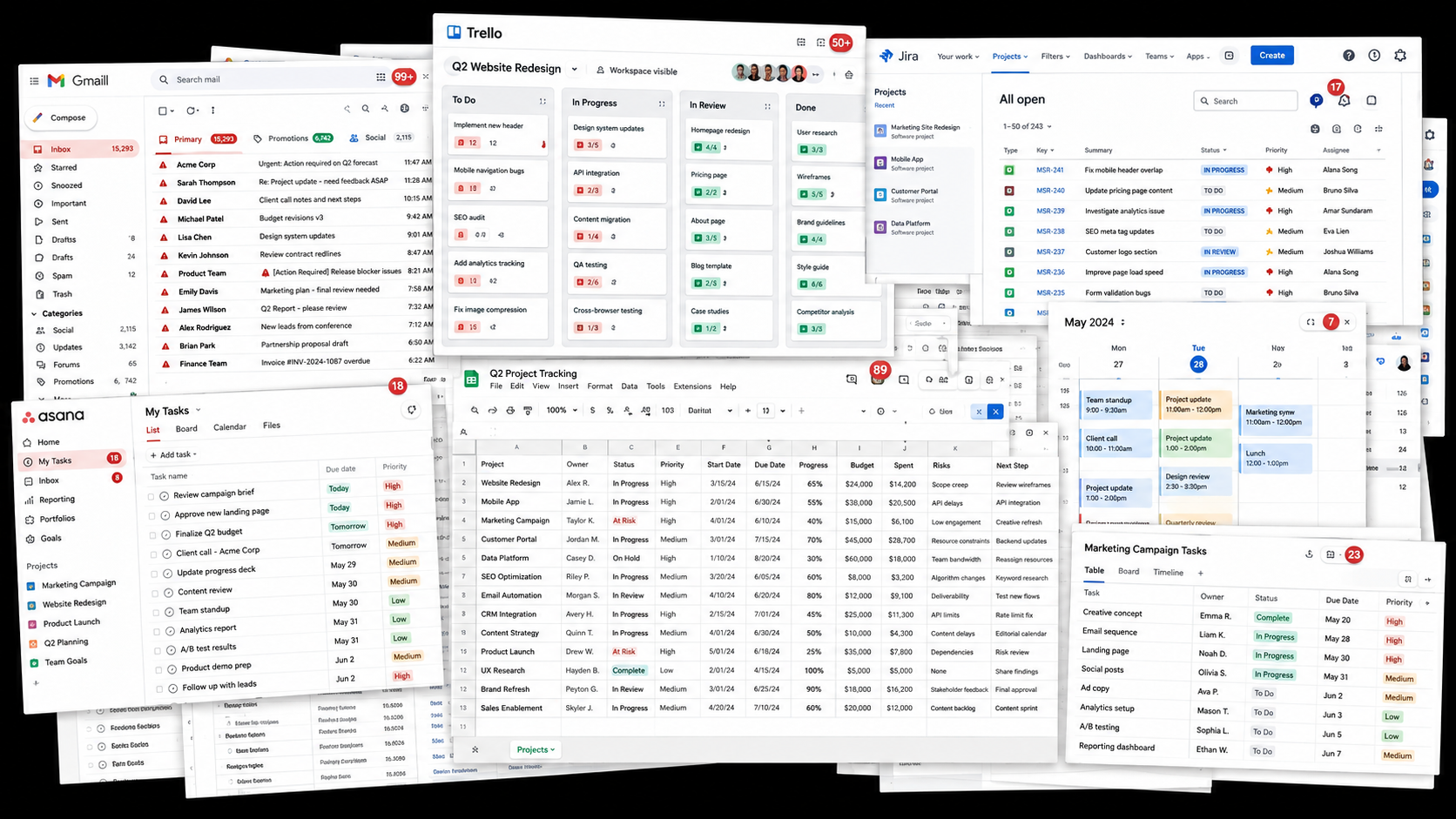
- You manage client work across more than one place and something always slips between tools.
- You keep follow-ups, deadlines or project details in your head because there is no single operating view.
- You have tried to organize your work in Notion before, but the workspace became messy or stopped being used.
- You sell services, not software, but your business still needs an operating system.
If you nodded at any of these, Methodvia OS was built for exactly where you are.
Meet Methodvia OS.
A complete client-work operating system for freelancers, consultants, and service businesses. Built to run on the Notion free plan.
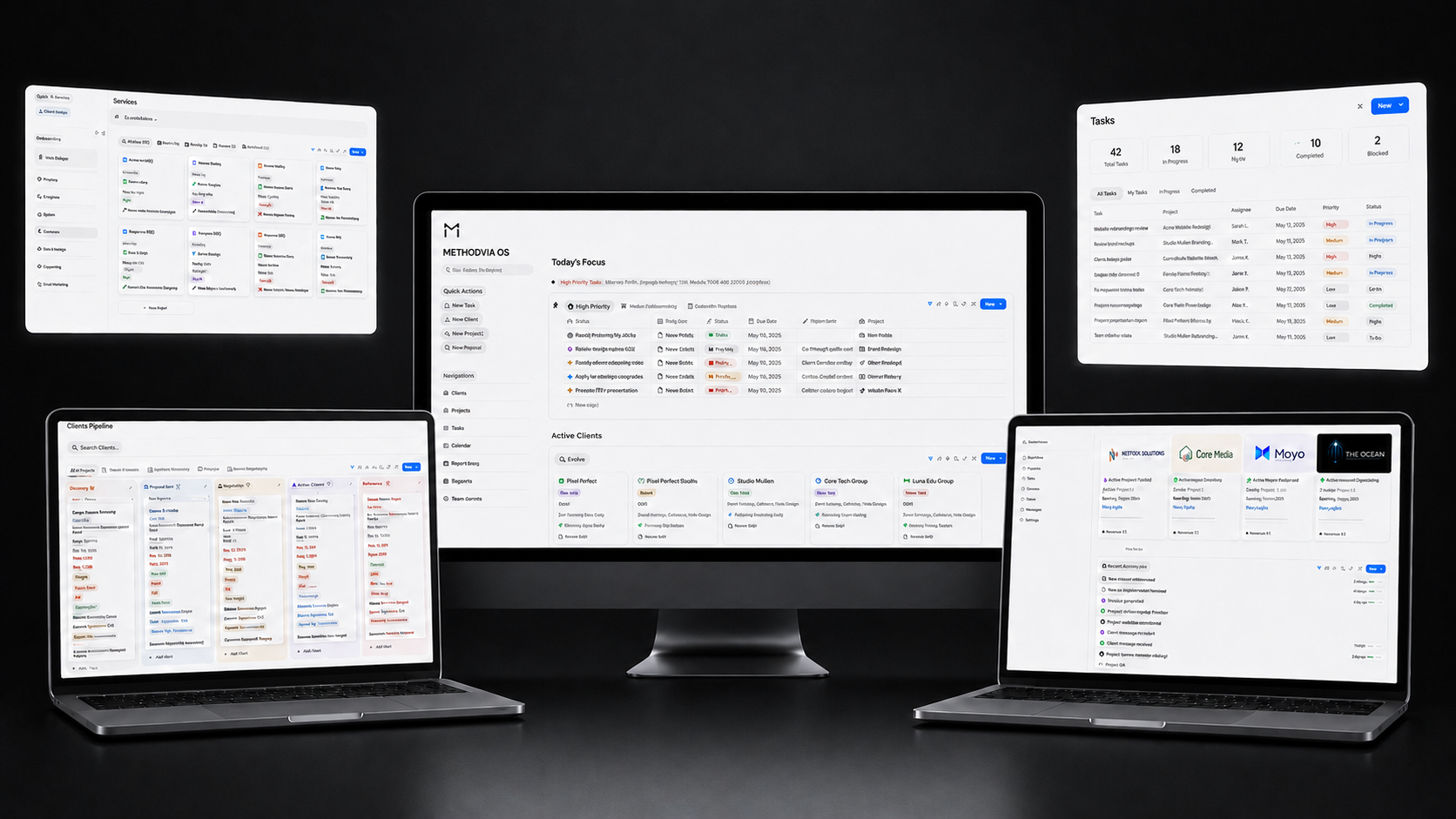
- Client Hub
- Project Pipeline
- Task Manager
- Invoice & Payment Log
- Weekly CEO Dashboard
- SOP Library
- 30 AI Boost Prompts
- Quick Setup Guide
- Complete Walkthrough
- Core Updates Included
Runs on the Notion free plan. No paid upgrade required for the core workspace.
Instant delivery · 30-day guarantee · Secure checkout
Tested by operators running real client work.
Freelancers, consultants, agencies and service businesses are validating a system built to hold up when clients, delivery, payments and follow-ups start moving at the same time.
"I like that it doesn’t try to do too much visually.. Some systems look impressive and then become hard to use after a week. This feels more grounded.... I can see myself actually using it for client delivery not just setting it up once and forgetting about it"

"The AI prompts were better than I expected. They're tied to real client situations, not generic. Beats staring at a blank chat every Monday."

"For me it’s mostly about visibility. I can see what’s active, what’s waiting, and what needs a follow up without opening five different places... Not just pretty dashboards."

"Finally a Notion setup that didn’t make me feel like I had to build the system myself. "

"I onboarded three new clients last month without writing a single email from scratch. The intake flow does the work for me."

"clean practical and not overloaded. That’s what I liked!! "

"I bought it because my client work was getting too spread out… Much easier than starting from a blank Notion page again.!"

"the invoice section is the part I didn’t expect to use that much but I do..... just having pending payments and reminders in the same place as the client work makes things less annoying to manage!"

"I've bought three Notion system before. This is the first one I still use after month two. The structure holds up under real client load."

"I’ve bought a few Notion products before, and most of them looked nice but were hard to stick with. This one feels more like a real workspace. So far, so good."

"I run a small service business and the main issue for me was never the work itself. It was keeping track of all the small things around the work (clients, invoices, ….). I’ve tried fixing that with spreadsheets and a few Notion pages, but it always became messy again... This setup gave me a much cleaner starting point. I did not use every single part exactly as it came, and I changed a few labels for my business but the structure made sense from the beginning. The biggest difference is that I can open one workspace and understand what is happening without rebuilding the picture every time. That saves time.. For me, that was worth it!"

"It looks premium, but the real value is the way it forces a weekly rhythm. Monday review, Friday close. Simple. It works."

"I like that it doesn’t try to do too much visually.. Some systems look impressive and then become hard to use after a week. This feels more grounded.... I can see myself actually using it for client delivery not just setting it up once and forgetting about it"
"The AI prompts were better than I expected. They're tied to real client situations, not generic. Beats staring at a blank chat every Monday."
"For me it’s mostly about visibility. I can see what’s active, what’s waiting, and what needs a follow up without opening five different places... Not just pretty dashboards."
"Finally a Notion setup that didn’t make me feel like I had to build the system myself. "
"I onboarded three new clients last month without writing a single email from scratch. The intake flow does the work for me."
"clean practical and not overloaded. That’s what I liked!! "
"I bought it because my client work was getting too spread out… Much easier than starting from a blank Notion page again.!"
"the invoice section is the part I didn’t expect to use that much but I do..... just having pending payments and reminders in the same place as the client work makes things less annoying to manage!"
"I've bought three Notion system before. This is the first one I still use after month two. The structure holds up under real client load."
"I’ve bought a few Notion products before, and most of them looked nice but were hard to stick with. This one feels more like a real workspace. So far, so good."
"I run a small service business and the main issue for me was never the work itself. It was keeping track of all the small things around the work (clients, invoices, ….). I’ve tried fixing that with spreadsheets and a few Notion pages, but it always became messy again... This setup gave me a much cleaner starting point. I did not use every single part exactly as it came, and I changed a few labels for my business but the structure made sense from the beginning. The biggest difference is that I can open one workspace and understand what is happening without rebuilding the picture every time. That saves time.. For me, that was worth it!"
"It looks premium, but the real value is the way it forces a weekly rhythm. Monday review, Friday close. Simple. It works."
"I like that it doesn’t try to do too much visually.. Some systems look impressive and then become hard to use after a week. This feels more grounded.... I can see myself actually using it for client delivery not just setting it up once and forgetting about it"
"The AI prompts were better than I expected. They're tied to real client situations, not generic. Beats staring at a blank chat every Monday."
"For me it’s mostly about visibility. I can see what’s active, what’s waiting, and what needs a follow up without opening five different places... Not just pretty dashboards."
"Finally a Notion setup that didn’t make me feel like I had to build the system myself. "
"I onboarded three new clients last month without writing a single email from scratch. The intake flow does the work for me."
"clean practical and not overloaded. That’s what I liked!! "
"I bought it because my client work was getting too spread out… Much easier than starting from a blank Notion page again.!"
"the invoice section is the part I didn’t expect to use that much but I do..... just having pending payments and reminders in the same place as the client work makes things less annoying to manage!"
"I've bought three Notion system before. This is the first one I still use after month two. The structure holds up under real client load."
"I’ve bought a few Notion products before, and most of them looked nice but were hard to stick with. This one feels more like a real workspace. So far, so good."
"I run a small service business and the main issue for me was never the work itself. It was keeping track of all the small things around the work (clients, invoices, ….). I’ve tried fixing that with spreadsheets and a few Notion pages, but it always became messy again... This setup gave me a much cleaner starting point. I did not use every single part exactly as it came, and I changed a few labels for my business but the structure made sense from the beginning. The biggest difference is that I can open one workspace and understand what is happening without rebuilding the picture every time. That saves time.. For me, that was worth it!"
"It looks premium, but the real value is the way it forces a weekly rhythm. Monday review, Friday close. Simple. It works."
"I like that it doesn’t try to do too much visually.. Some systems look impressive and then become hard to use after a week. This feels more grounded.... I can see myself actually using it for client delivery not just setting it up once and forgetting about it"
"The AI prompts were better than I expected. They're tied to real client situations, not generic. Beats staring at a blank chat every Monday."
"For me it’s mostly about visibility. I can see what’s active, what’s waiting, and what needs a follow up without opening five different places... Not just pretty dashboards."
"Finally a Notion setup that didn’t make me feel like I had to build the system myself. "
"I onboarded three new clients last month without writing a single email from scratch. The intake flow does the work for me."
"clean practical and not overloaded. That’s what I liked!! "
"I bought it because my client work was getting too spread out… Much easier than starting from a blank Notion page again.!"
"the invoice section is the part I didn’t expect to use that much but I do..... just having pending payments and reminders in the same place as the client work makes things less annoying to manage!"
"I've bought three Notion system before. This is the first one I still use after month two. The structure holds up under real client load."
"I’ve bought a few Notion products before, and most of them looked nice but were hard to stick with. This one feels more like a real workspace. So far, so good."
"I run a small service business and the main issue for me was never the work itself. It was keeping track of all the small things around the work (clients, invoices, ….). I’ve tried fixing that with spreadsheets and a few Notion pages, but it always became messy again... This setup gave me a much cleaner starting point. I did not use every single part exactly as it came, and I changed a few labels for my business but the structure made sense from the beginning. The biggest difference is that I can open one workspace and understand what is happening without rebuilding the picture every time. That saves time.. For me, that was worth it!"
"It looks premium, but the real value is the way it forces a weekly rhythm. Monday review, Friday close. Simple. It works."
Built around how client work actually moves.
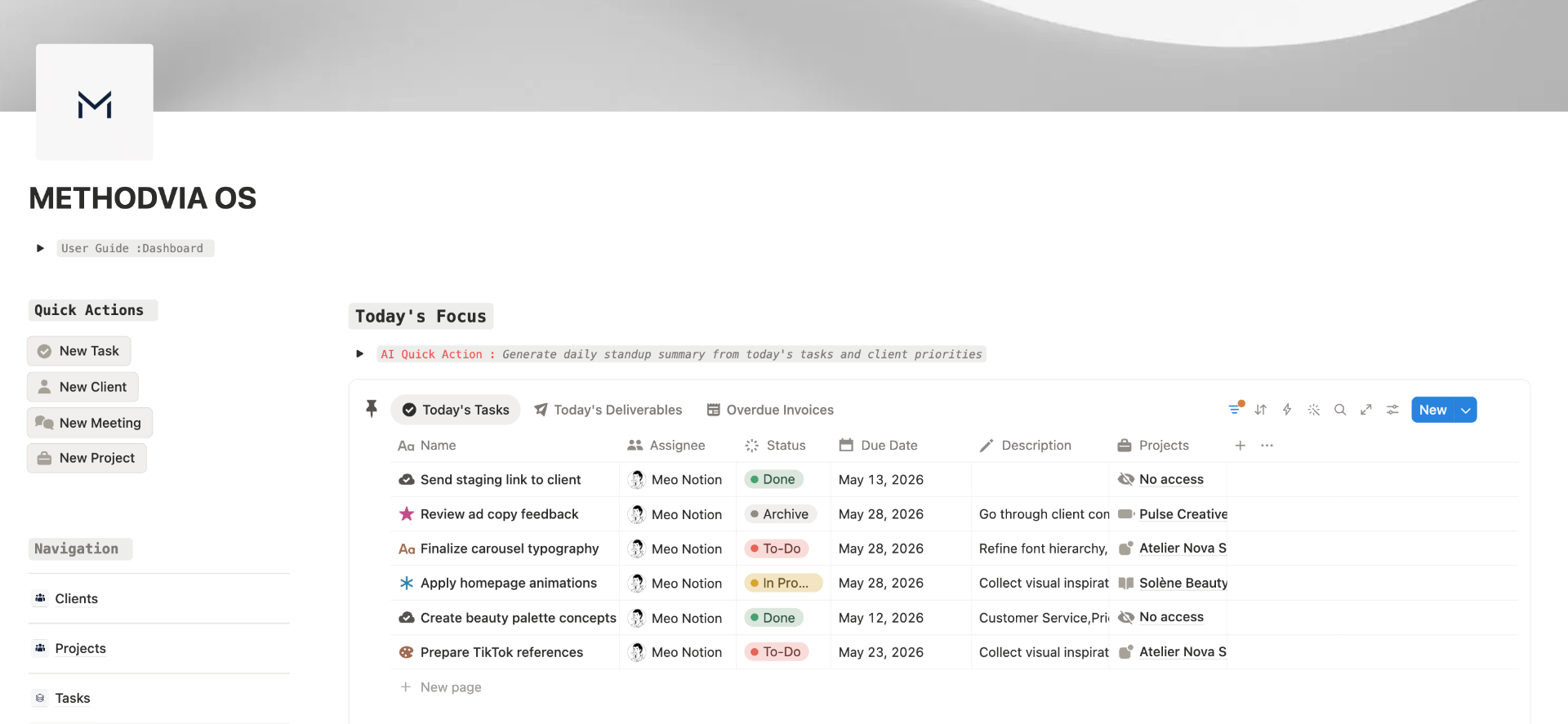
See what needs attention before it slips.
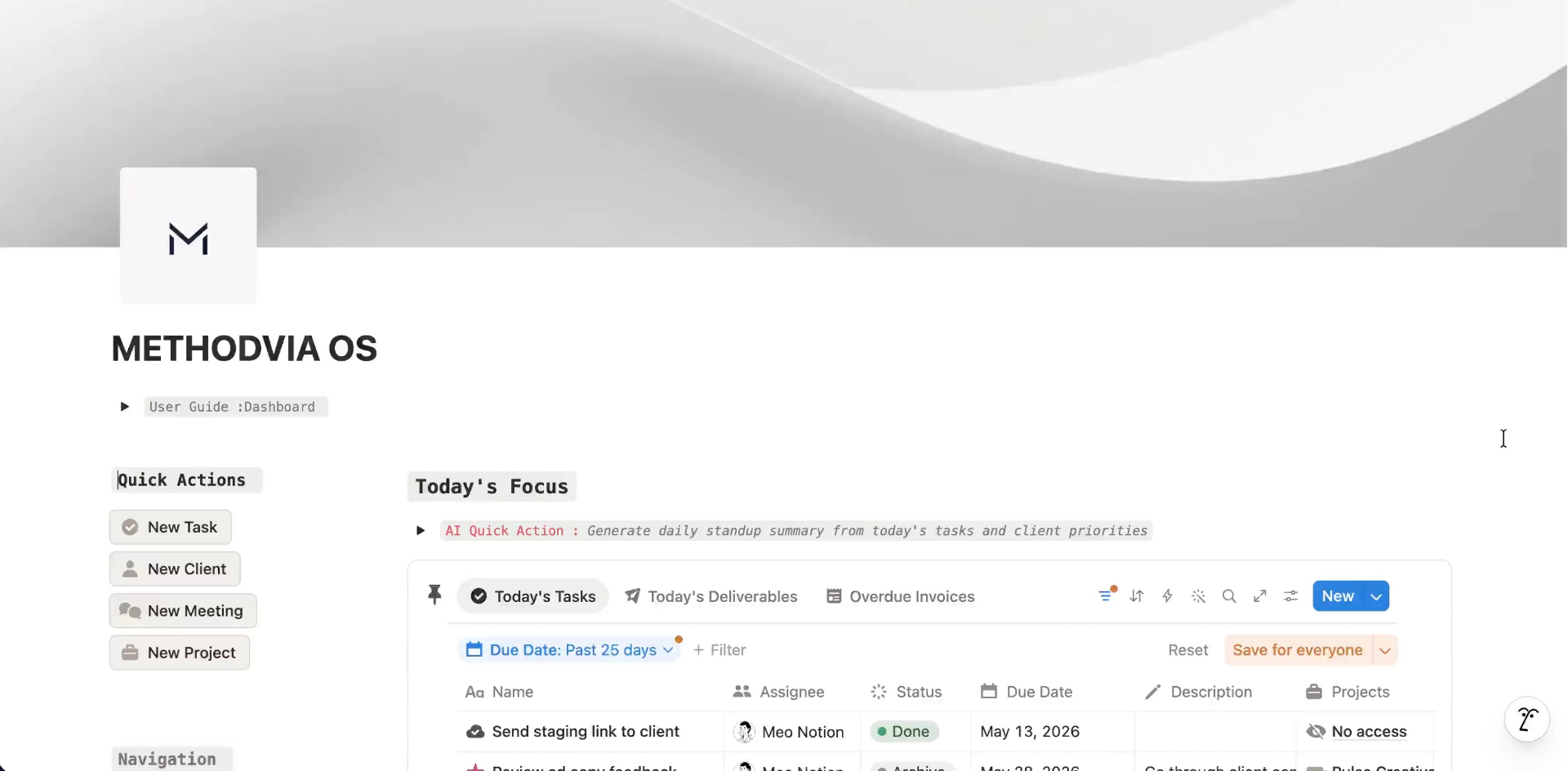
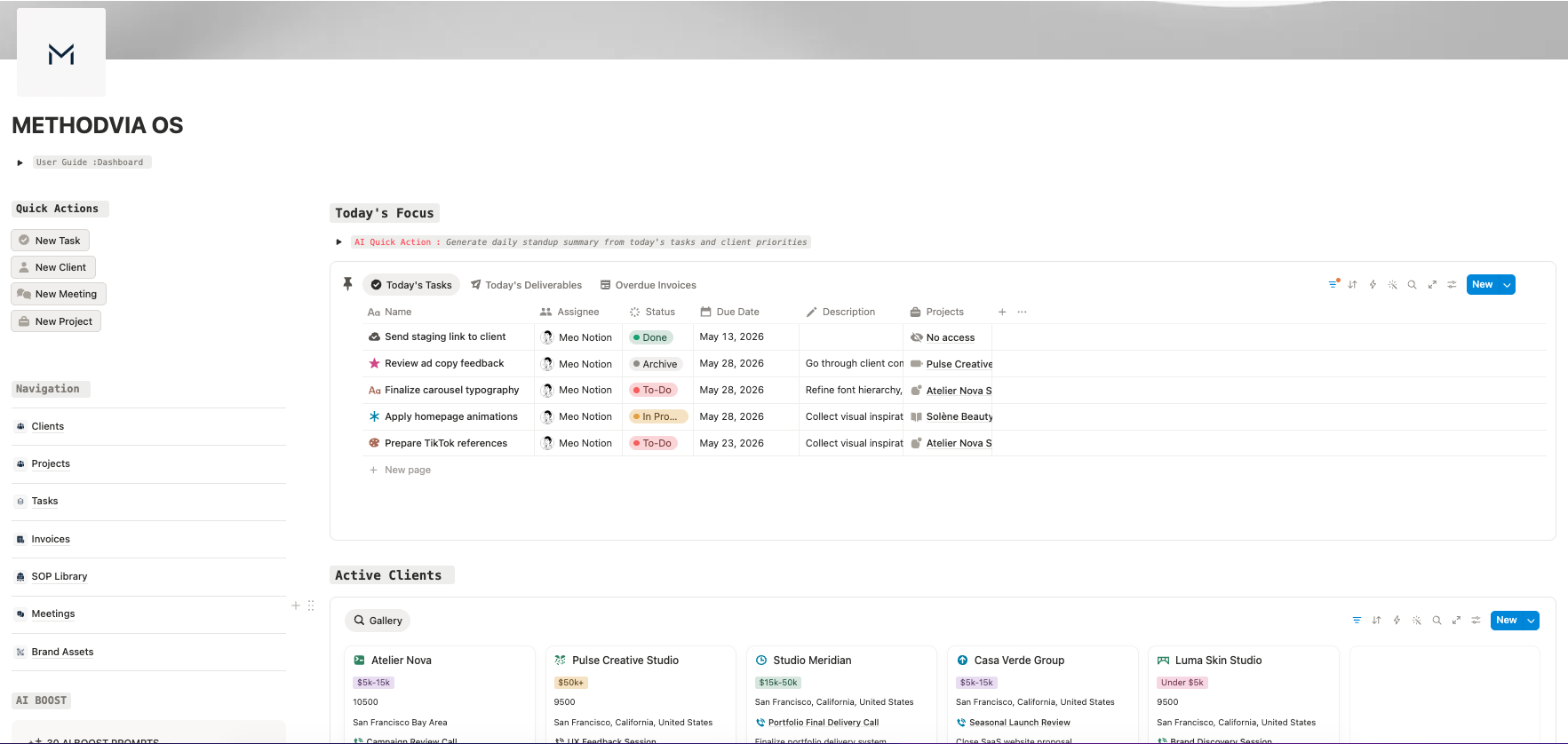
Today's Focus brings your most important tasks, deliverables and overdue invoices into one place, so you know what to handle first.
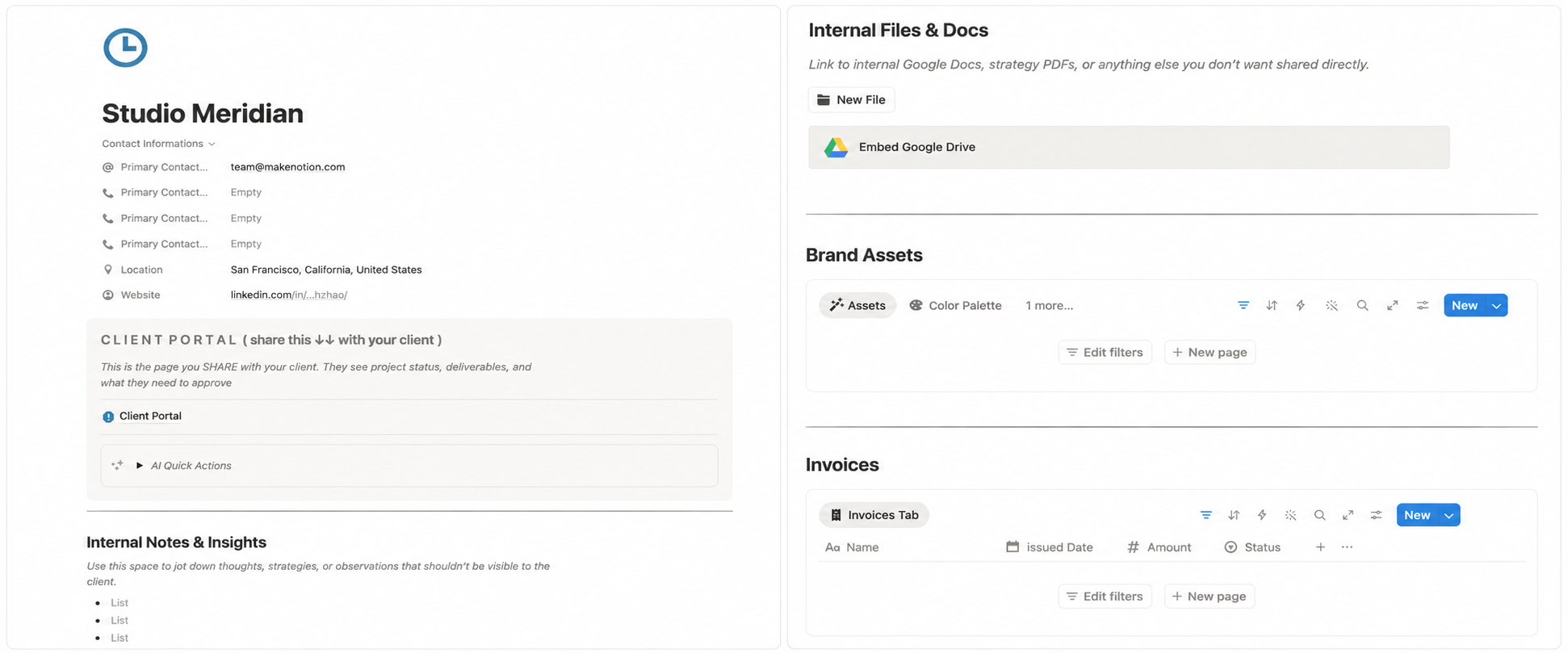
Every new client launches with the same internal structure.
The Clients section gives every client a clean internal workspace for notes, meetings, scope, deliverables and next steps. You stop rebuilding from scratch every time.
Each client workspace includes embedded prompt shortcuts for follow-ups, next actions, intake notes and client summaries. Copy the prompt, paste it into your AI tool and move faster without rewriting from scratch.
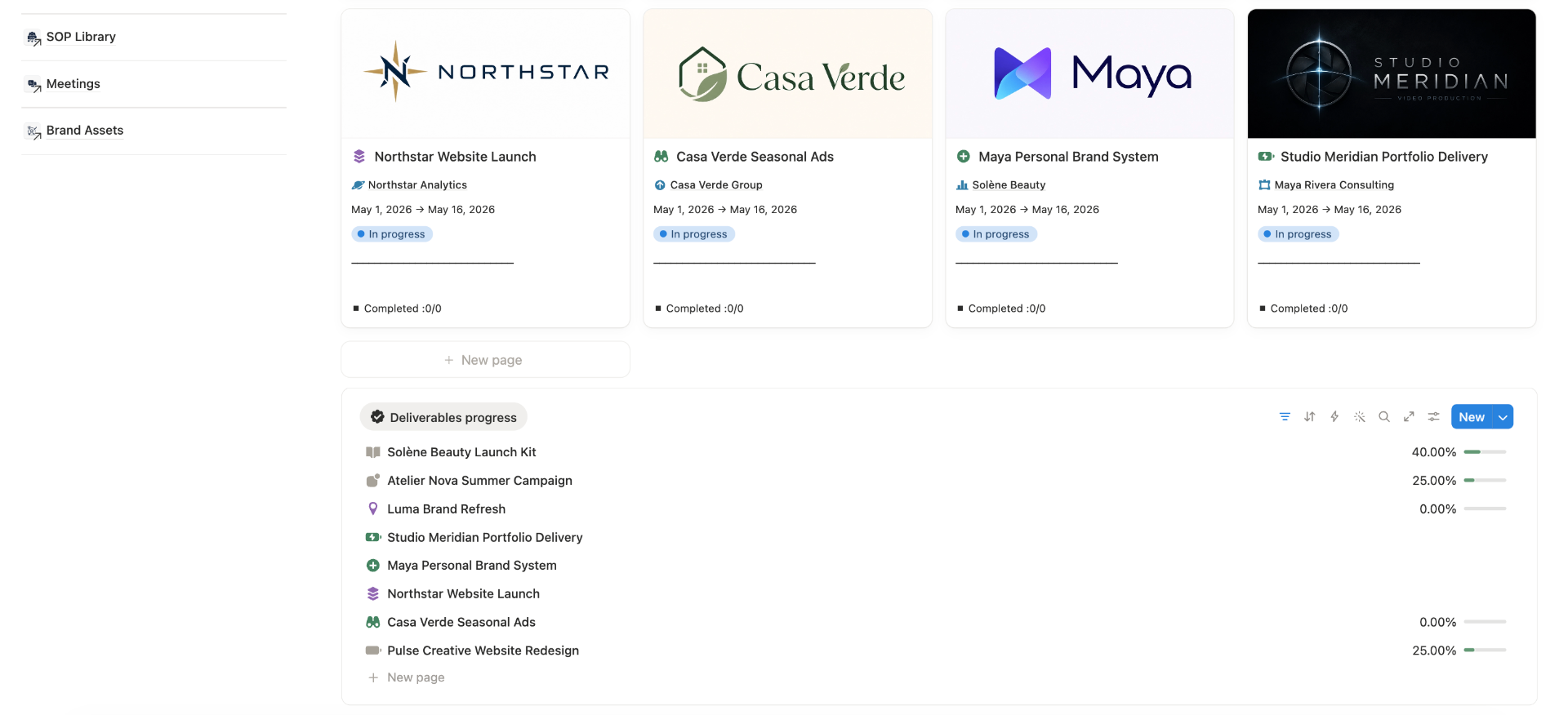
See where every project stands before it stalls.
The Projects section shows active, pending, blocked and completed work in one pipeline, so you can spot delivery risk before it turns into client friction.
Real people walking through real client-work problems.
Short workflow videos showing how Methodvia OS brings structure, clarity and control to the way freelancers, consultants and service businesses manage clients, projects and delivery.
Robert Ellis
Small Agency Owner
Daniel Hollingsworth
Web Designer & Consultant
Emily Comer
Brand Strategist
Explore the workspace before you buy it.
Click through the core sections and see how client work moves from scattered tools, tabs and memory into one connected workspace.
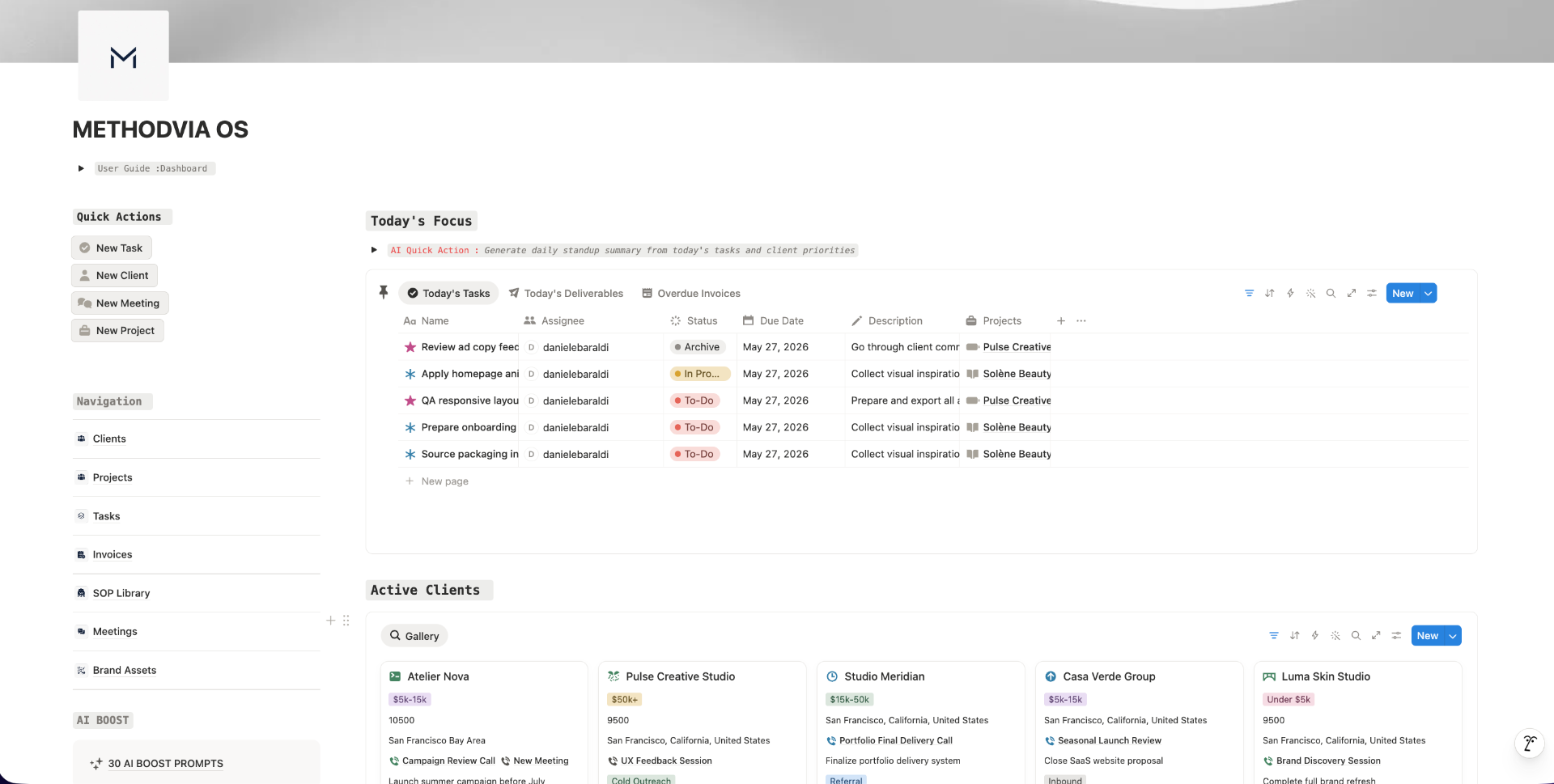
Your daily operating view. Priorities, active clients, projects, and overdue items all in one place.
No guesswork. No generic previews. You can see the actual workspace before you decide.
AI workflows.
No Notion AI subscription required.
30 prompts and quick actions that run inside your workflow. Use them with any AI assistant you already have.
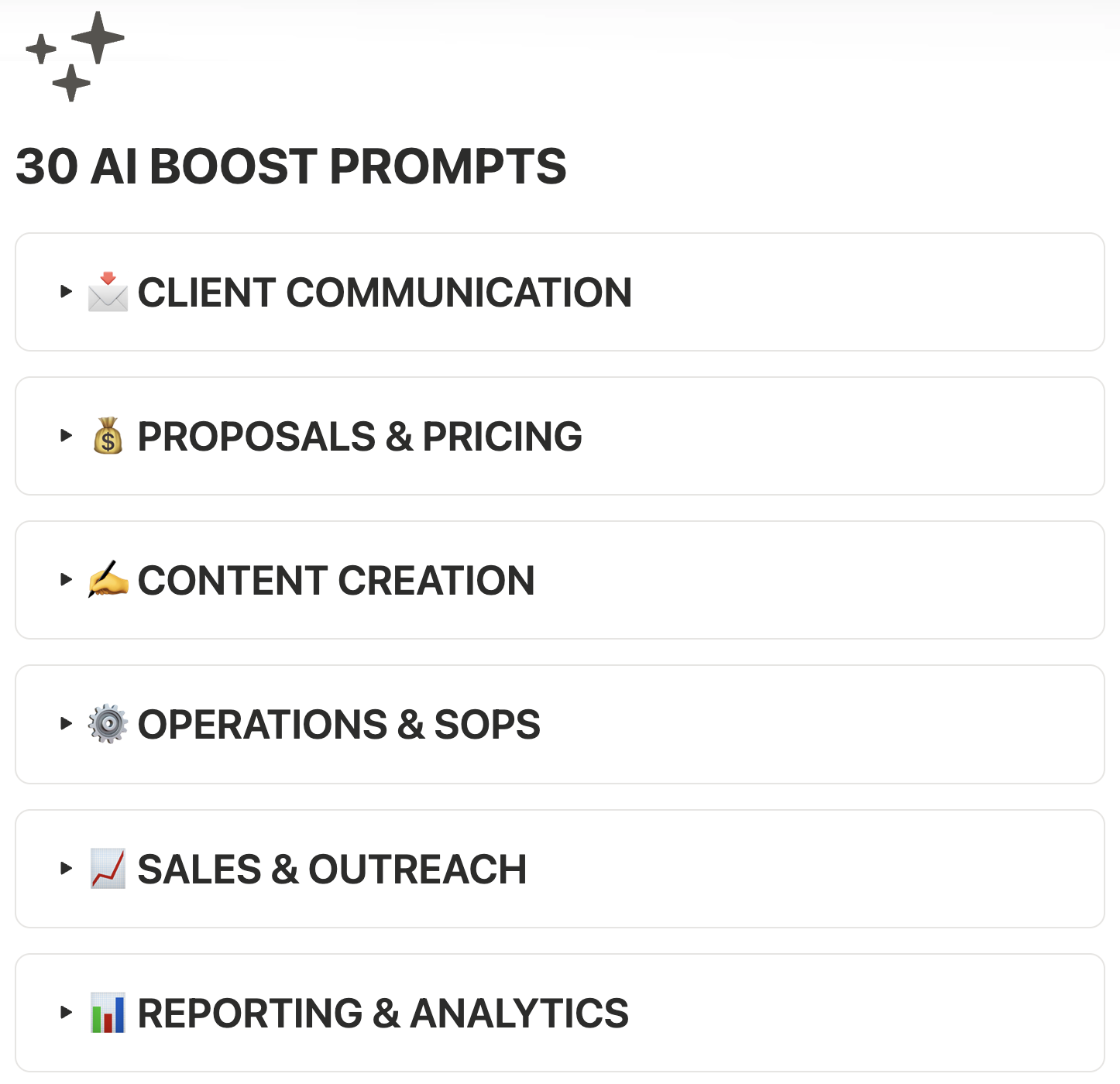
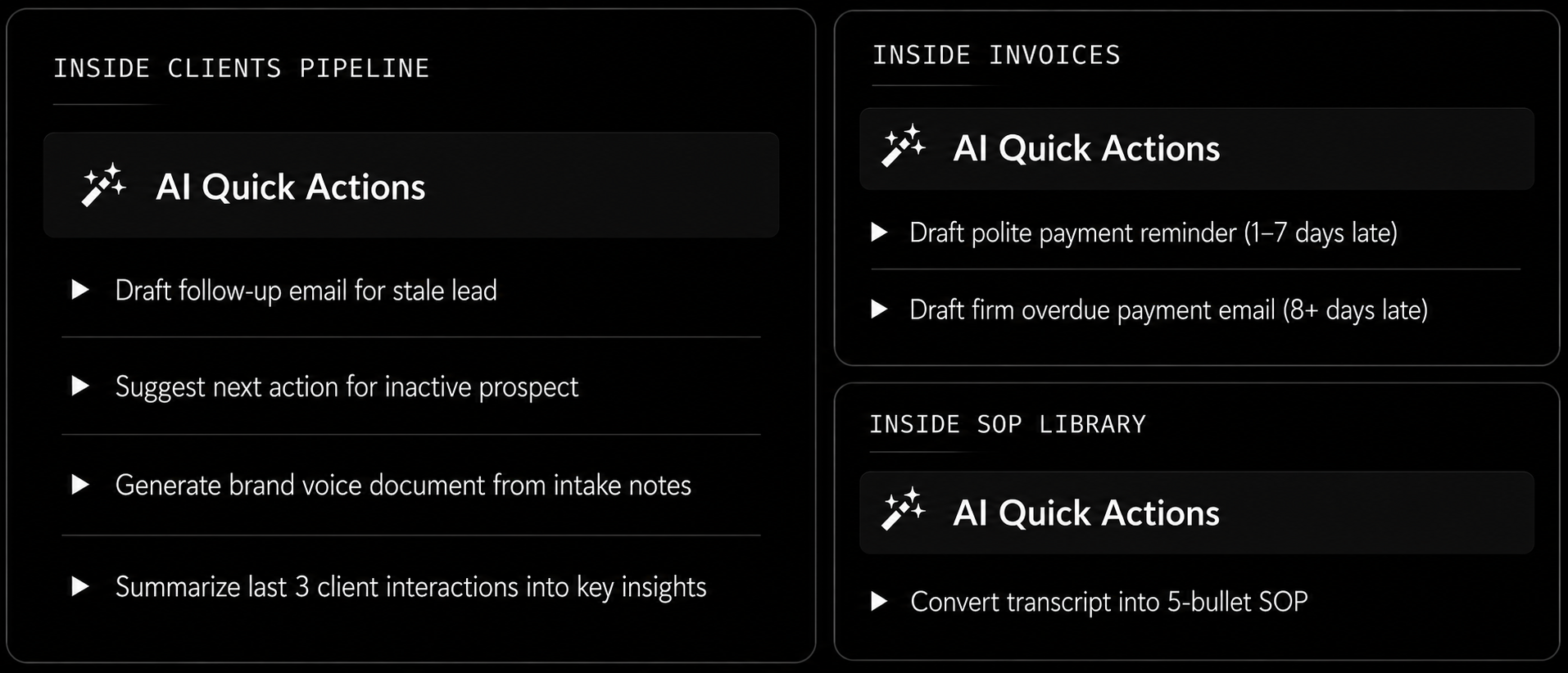

- —Workspace Architecture
- —Connected Database Systems
- —Service-Business Workflows
Built by a Notion OS specialist.
Kevin Caldwell is the developer behind Methodvia OS.
With 9 years of experience building structured Notion workspaces, he started with classic templates and lightweight productivity systems before specializing in complex Notion operating systems built for real operational use.
Over time, his work evolved from simple dashboards into connected systems for clients, projects, tasks, delivery, documentation and follow-ups.
Methodvia OS is the result of that evolution: a complete operating system for service businesses that need more structure, clarity and control.
Everything you just saw. One system.
You've walked through the workspace, the features and the workflow. This is where you take it.
- Client Hub
- Project Pipeline
- Task Manager
- Invoice & Payment Log
- Weekly CEO Dashboard
- SOP Library
- 30 AI Boost Prompts
- Quick Setup Guide
- Complete Walkthrough
- Core Updates Included
Runs on the Notion free plan. No paid upgrade required for the core workspace.
Instant delivery · 30-day guarantee · Secure checkout
You probably already pay more than this. Every month.
Stop renting your business. One payment replaces the stack you keep paying for.
You are buying back control.
No Surprise Notion Bill After Checkout
The hidden-cost problem.
A one-time system should not quietly turn into another monthly software bill after you buy it.
Methodvia OS
Built to run on the Notion free plan. No paid Notion plan required for the core workspace.
METHODVIA OS
$47 once
NOTION UPGRADE
$0/month required
CORE WORKSPACE
Runs on free plan
$47 once. $0/month. No paid Notion upgrade required.
The Complete Operating System for Service Businesses
Clients, projects, tasks, invoices and follow-ups. All linked.
- Client Hubkeep every client, project and relationship in one central place
- Project Pipelinesee what is active, pending, blocked, overdue or complete
- Task Managerorganize execution without losing track of what matters next
- Delivery Trackermonitor project status, handoffs, deadlines and delivery risk
- Invoice & Payment Logtrack payments, invoice status and financial follow-ups
- Weekly CEO Dashboardopen one view and see what needs attention this week
- Templated Client Pagestart every client with the same clean internal structure
- SOP Librarykeep repeatable processes documented and easy to reuse
- Quick Setup Guideget live fast without needing Notion mastery
- Complete Product Walkthroughlearn how to use the full system step by step
- Migration Cheatsheetmove from Trello, Asana, ClickUp or Sheets with less friction
- Core Updates Includedcore workspace improvements included if released
One payment - No paid Notion plan required for the core workspace
Early launch price available now.
Full refund for 30 days · Instant Notion delivery · Secure checkout
From scattered to one system in 15 minutes.
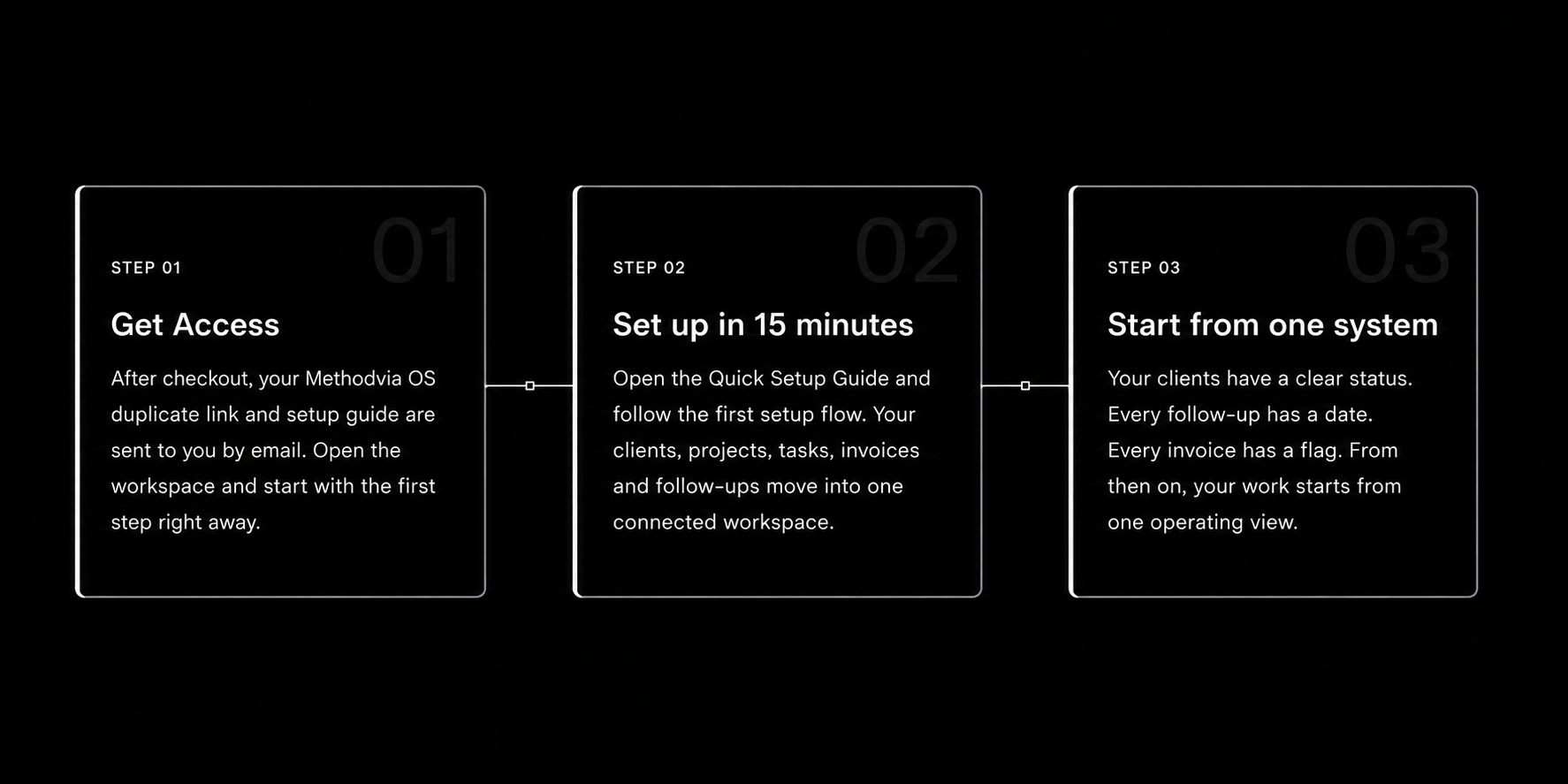
Before you decide.
Stop running your business from memory. Start running it from one system.Stop running your business from memory. Start running it from one system.
Early launch price available now. Try Methodvia OS for 30 days. If it does not fit your workflow, get your money back.
Full refund for 30 days · Secure checkout · Instant access · Works with the Notion free plan